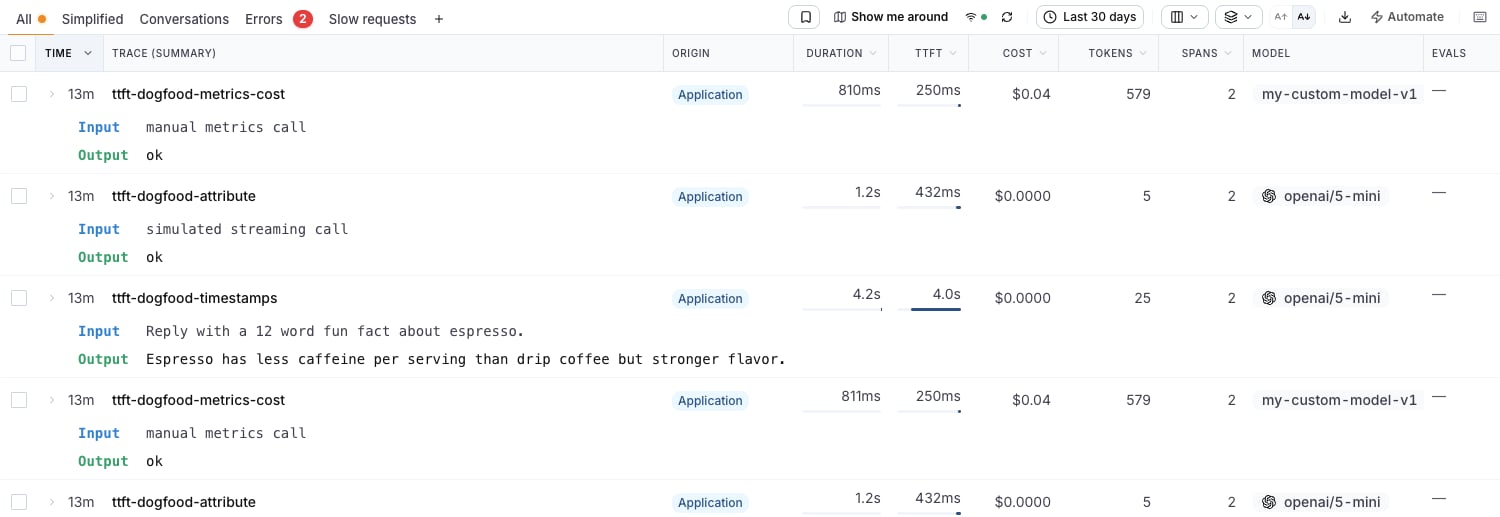
Time to First Token (TTFT) measures how long your users wait between sending a request and seeing the first piece of the streamed answer. For streaming LLM applications it is usually a better proxy for perceived speed than total duration: a response can take 20 seconds to finish and still feel instant if the first token arrives in 300ms. LangWatch captures TTFT per LLM span, rolls it up to the trace, and surfaces it across the product:
Traces table with the TTFT column enabled, showing values and p95-scaled bars

Automatic capture

If your instrumentation already emits any of the signals below, TTFT shows up without any extra code:
SourceSignal
OpenLLMetry / OpenLIT instrumentorsllm.content.completion.chunk / First Token Stream Event span events
OTel GenAI semconv emittersgen_ai.server.time_to_first_token span attribute (milliseconds)
Vercel AI SDKai.response.msToFirstChunk span attribute
LangWatch SDKstimestamps.first_token_at on the span (see below)
When more than one LLM span in a trace reports a TTFT, the trace-level value is the smallest one, the first token the user could have seen.

Setting TTFT manually

If you handle streaming yourself, capture the timestamp of the first chunk and pass it through update(timestamps=...). The value is the unix epoch timestamp in milliseconds at which the first token arrived, not the elapsed duration:
import time
import langwatch
from openai import OpenAI

client = OpenAI()


@langwatch.span(type="llm")
def stream_completion(prompt: str) -> str:
    span = langwatch.get_current_span()
    span.update(model="openai/gpt-5-mini", input=prompt)

    first_token_at = None
    chunks = []
    stream = client.chat.completions.create(
        model="gpt-5-mini",
        messages=[{"role": "user", "content": prompt}],
        stream=True,
    )
    for chunk in stream:
        if first_token_at is None:
            first_token_at = round(time.time() * 1000)  # epoch milliseconds
        if chunk.choices and chunk.choices[0].delta.content:
            chunks.append(chunk.choices[0].delta.content)

    span.update(
        output="".join(chunks),
        timestamps={"first_token_at": first_token_at},
    )
    return "".join(chunks)


@langwatch.trace()
def main():
    return stream_completion("Tell me about LangWatch")
LangWatch computes TTFT as first_token_at - started_at. You don’t need to set started_at or finished_at, those fall back to the span’s own start and end times.
Assigning to the dict directly, e.g. langwatch.get_current_span().timestamps["first_token_at"] = ..., does not work. The timestamps are only exported to the underlying OpenTelemetry span when they go through update(timestamps=...).

If you already have the duration

When your code measures the elapsed time instead of the wall-clock timestamp, report it through either of these equivalents:
span = langwatch.get_current_span()

# Option A: OTel GenAI semconv attribute, duration in milliseconds
span.set_attributes({"gen_ai.server.time_to_first_token": ttft_ms})

# Option B: LangWatch metrics field, duration in milliseconds
span.update(metrics={"first_token_ms": ttft_ms})

REST API

If you send spans through the REST API instead of the SDK, set first_token_at (epoch milliseconds) in the span’s timestamps object:
{
  "type": "llm",
  "span_id": "span-123",
  "timestamps": {
    "started_at": 1718886000000,
    "first_token_at": 1718886000800,
    "finished_at": 1718886004200
  }
}

Where TTFT shows up

Traces table column

On the Traces page, open the columns picker (the columns icon in the toolbar) and enable TTFT. The column behaves like the Duration column: each cell shows the value plus an inline bar scaled to the 95th percentile of the visible page, so one slow outlier doesn’t flatten every other row. Rows at or above the page’s TTFT p95 render a full red bar.
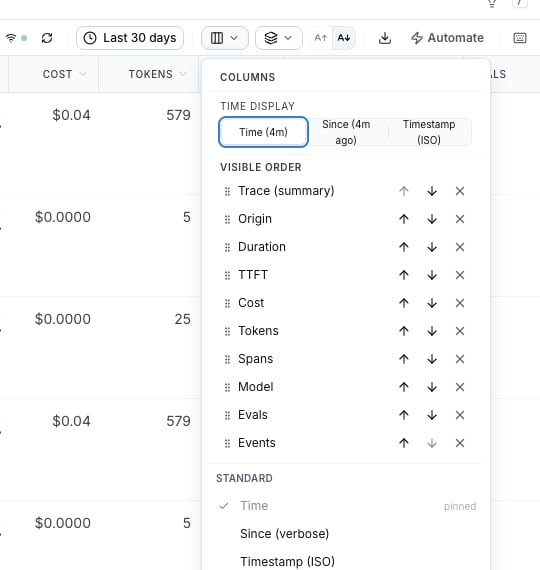
Columns picker with the TTFT column
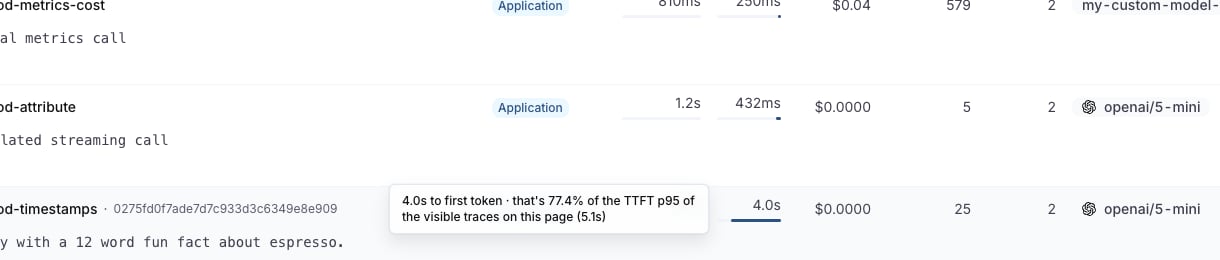
Hovering a cell shows how that trace compares against the page’s TTFT p95:
TTFT cell tooltip showing the percentage of the page's TTFT p95
The column is sortable, so you can order by TTFT to chase your slowest streaming starts.

Trace details

The trace drawer shows a TTFT pill in the header next to duration, cost, and tokens:
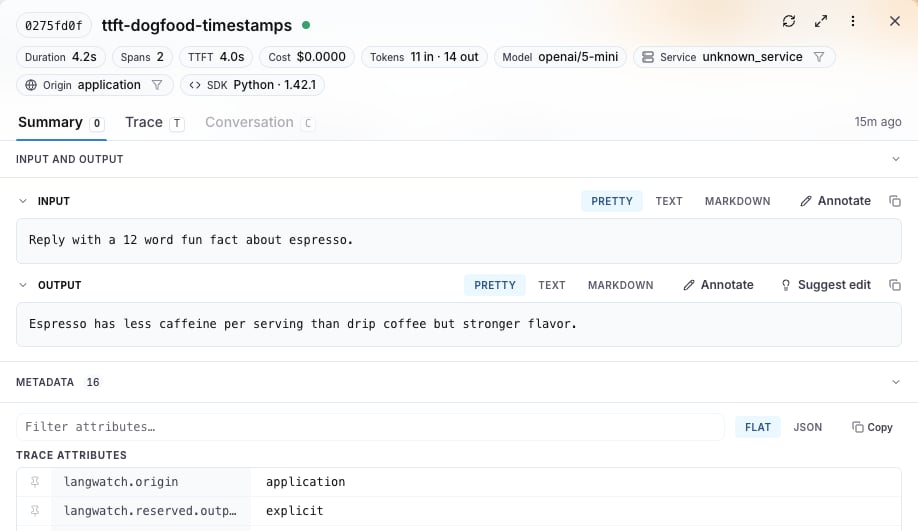
Trace drawer header showing the TTFT pill

Analytics

In Analytics > LLM Metrics you get time-to-first-token graphs with the usual aggregations (median, p90, p95, p99), and you can build custom graphs on the same metric for dashboards and alerting.

Troubleshooting

  • TTFT shows ”—” in the table: the trace has no LLM span reporting any of the signals above. For non-streaming calls this is expected, there is no “first token” moment distinct from the response itself.
  • Value looks wrong by orders of magnitude: check the units. first_token_at is an epoch timestamp in milliseconds; gen_ai.server.time_to_first_token and first_token_ms are durations in milliseconds.
  • You set timestamps but nothing shows: make sure the values go through span.update(timestamps=...) rather than mutating span.timestamps in place.