
LangGraph observability and testing: trace every node, test every path
Trace every node, model call and tool call of a LangGraph agent with one callback, then test whole conversations with Scenario in pytest and CI. A hands-on walk through a real graph, the span tree it produced and the bug its tests caught.
 Rogerio Chaves · · Integrations
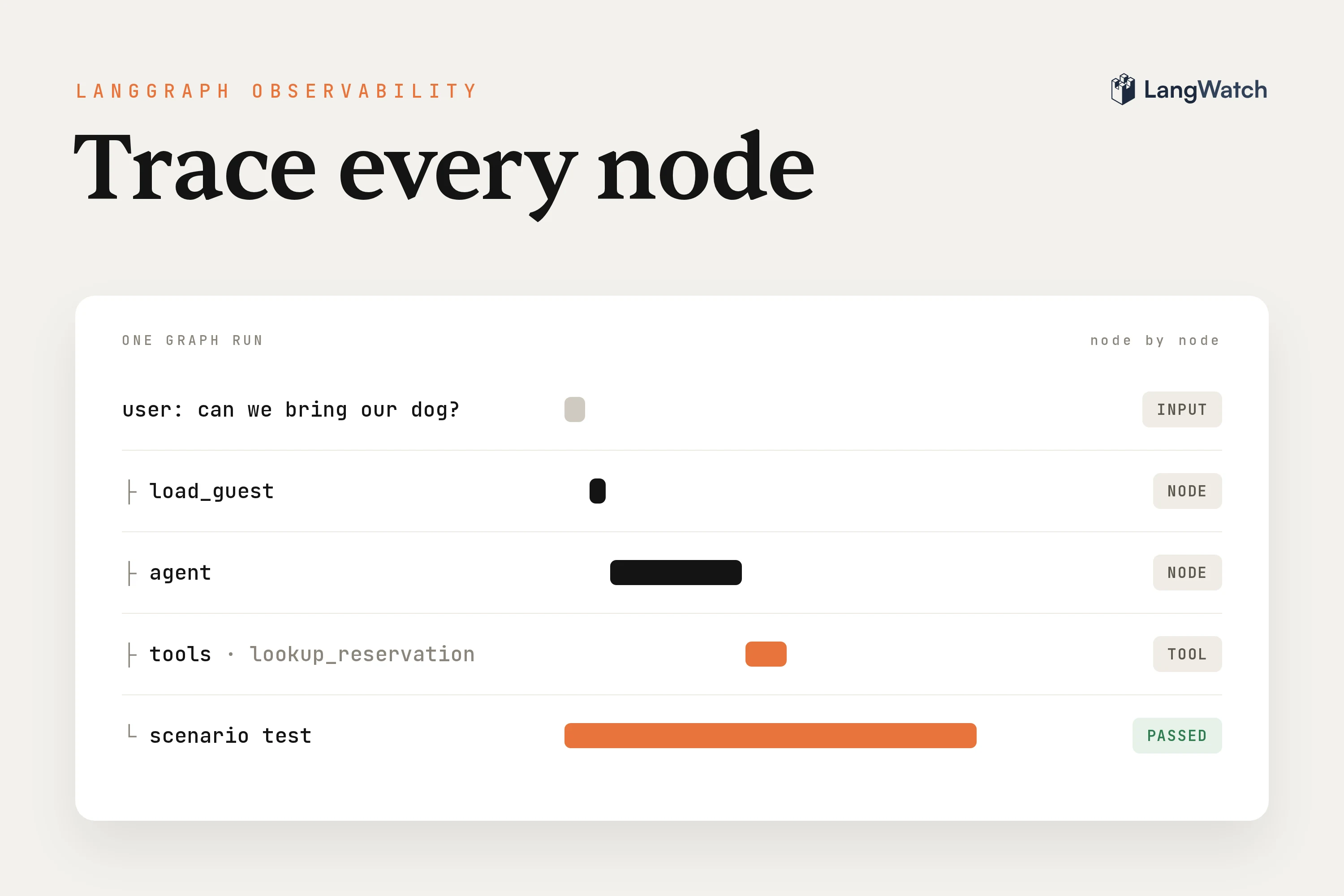
LangGraph observability means you can open any run of your graph and see every node that ran, what each model call got and returned, and every tool call with its arguments and result. Testing is the other half: running the graph through whole conversations before a change ships, and failing the build when it gets one wrong.
In October I was on a call with a small AI team that builds an assistant on LangGraph for holiday-park staff. It answers questions from their help center and looks up reservations and guests. They had around 60 scenarios, and a loop I liked a lot: a judge flags the conversations the assistant couldn't handle, they hand those to Claude to propose a fix, and in their engineer's words, "it's always testing first with scenarios." The team told me the scenarios are what's helping them develop really fast right now.
If your LangGraph agent is already in beta or production and you're just setting up tracing and tests, you can run that same loop. I built a small graph to show it: a guest support agent for a holiday park, with five tools, a checkpointer and three scenario tests.
How to trace a LangGraph agent
Pass the LangWatch callback in the config of graph.invoke(), inside a function decorated with @langwatch.trace(). LangGraph hands the callback to everything the run touches, so every node, every model call and every tool call becomes a span, with the state going into each node and the update coming out.
You don't change the graph itself. The LangGraph integration docs have the reference version of everything in the next section.
Instrument it in Python or TypeScript
In Python, install the SDK next to LangGraph and set LANGWATCH_API_KEY:
uv add langwatch langchain langgraph langchain-openai
My graph has three nodes: load_guest, a plain Python function that pulls the reservation id out of the message, agent, which calls the model with the tools bound, and tools, which runs the tool calls. A route function sends the run back to tools or ends it. The tracing happens in run_turn at the bottom:
import langwatch
from langchain.chat_models import init_chat_model
from langchain.messages import HumanMessage
from langchain_core.runnables import RunnableConfig
from langgraph.checkpoint.memory import InMemorySaver
from langgraph.graph import END, START, StateGraph

langwatch.setup()

TOOLS = [lookup_reservation, search_policies, find_pet_friendly_cottages, quote_change, move_reservation]
model = init_chat_model("gpt-6-luna", model_provider="openai", reasoning_effort="none").bind_tools(TOOLS)

builder = StateGraph(State)
builder.add_node("load_guest", load_guest)
builder.add_node("agent", agent)
builder.add_node("tools", tools)
builder.add_edge(START, "load_guest")
builder.add_edge("load_guest", "agent")
builder.add_conditional_edges("agent", route, ["tools", END])
builder.add_edge("tools", "agent")
graph = builder.compile(checkpointer=InMemorySaver())


@langwatch.trace(name="holiday-park-agent")
def run_turn(message: str, thread_id: str):
    trace = langwatch.get_current_trace()
    trace.update(metadata={"thread_id": thread_id, "labels": ["langgraph-demo"]})
    result = graph.invoke(
        {"messages": [HumanMessage(content=message)]},
        config=RunnableConfig(
            configurable={"thread_id": thread_id},
            callbacks=[trace.get_langchain_callback()],
        ),
    )
    msgs = result["messages"]
    last_human = max(i for i, m in enumerate(msgs) if isinstance(m, HumanMessage))
    return msgs[last_human + 1 :]  # this turn's new messages, tool calls included
reasoning_effort="none" is there because gpt-6 models only accept function tools on Chat Completions with reasoning off. I pass the same thread_id to the checkpointer and to the trace metadata, so LangWatch groups the turns of one conversation together, and the label makes these traces easy to filter later. The function returns the new messages, tool calls included, because the tests further down need them.
Put the callback on the graph call, never on the model inside one node. A callback on the model alone gives you LLM spans and nothing else: the tool node and the plain Python nodes never show up, so you can't tell which step the graph ran.
In TypeScript, the callback goes on the compiled graph with withConfig(). This is the shape from the TypeScript LangGraph docs:
import { setupObservability } from "langwatch/observability/node";
import { LangWatchCallbackHandler } from "langwatch/observability/instrumentation/langchain";
import { StateGraph, START, END, MemorySaver } from "@langchain/langgraph";

setupObservability({ serviceName: "holiday-park-agent" });

const app = new StateGraph(GraphState)
  .addNode("generate", generate)
  .addEdge(START, "generate")
  .addEdge("generate", END)
  .compile({ checkpointer: new MemorySaver() })
  .withConfig({ callbacks: [new LangWatchCallbackHandler()] });
Read a graph run: nodes, tool calls, state
I asked the agent "hi, we're on reservation RES-4821. can we bring our dog, and arrive a day later?" This is the span tree of that run, with each span's duration:
└── span: holiday-park-agent  6732 ms
    └── chain: LangGraph  6721 ms
        ├── chain: load_guest  3 ms
        ├── chain: agent  2199 ms
        │   ├── llm: llm (openai/gpt-6-luna)  2187 ms
        │   └── chain: route  3 ms
        ├── chain: tools  20 ms
        │   ├── tool: lookup_reservation  4 ms
        │   ├── tool: search_policies  3 ms
        │   └── tool: search_policies  3 ms
        ├── chain: agent  1721 ms
        │   ├── llm: llm (openai/gpt-6-luna)  1701 ms
        │   └── chain: route  6 ms
        ├── chain: tools  17 ms
        │   └── tool: find_pet_friendly_cottages  7 ms
        └── chain: agent  2733 ms
            ├── llm: llm (openai/gpt-6-luna)  2707 ms
            └── chain: route  7 ms
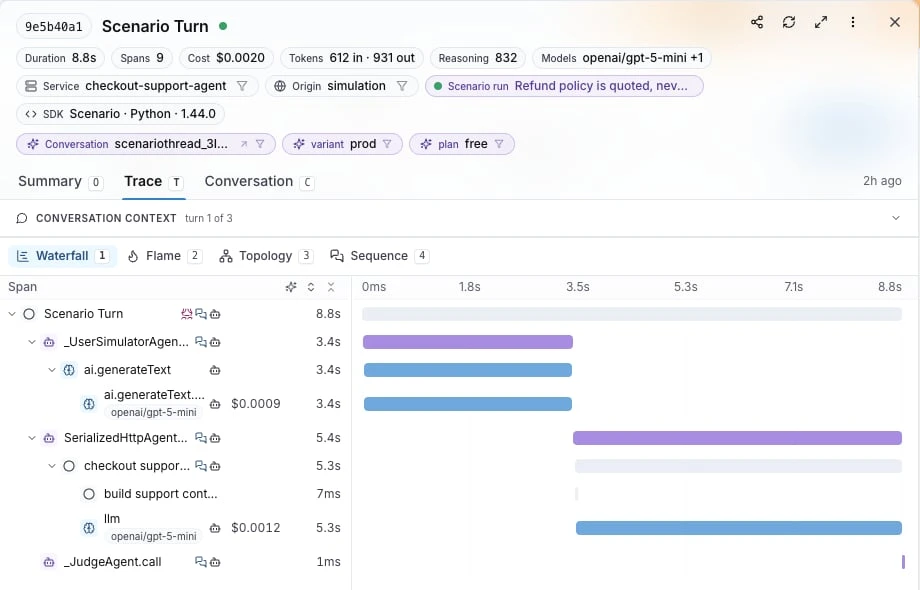
Each node is a chain span named after the node, and you can follow the graph's path from top to bottom: load_guest, then three rounds of agent, with tools in between. The route function shows up inside the agent node that ran it, and its output is where the graph went next: tools twice, then __end__.
The three model calls took all but about a tenth of a second of the run, and every tool answered in a few milliseconds. So when a LangGraph agent feels slow, count the agent rounds first, because every extra trip through tools costs you one more model call.
Click any node span to see the state. The input of load_guest is the message list going in, and its output is the update it returned, {"guest_context": "Reservation mentioned: RES-4821"}. The tools span's output holds each tool result, so when the agent says something wrong you can check right there whether the tool gave it bad data or the model got it wrong on its own.
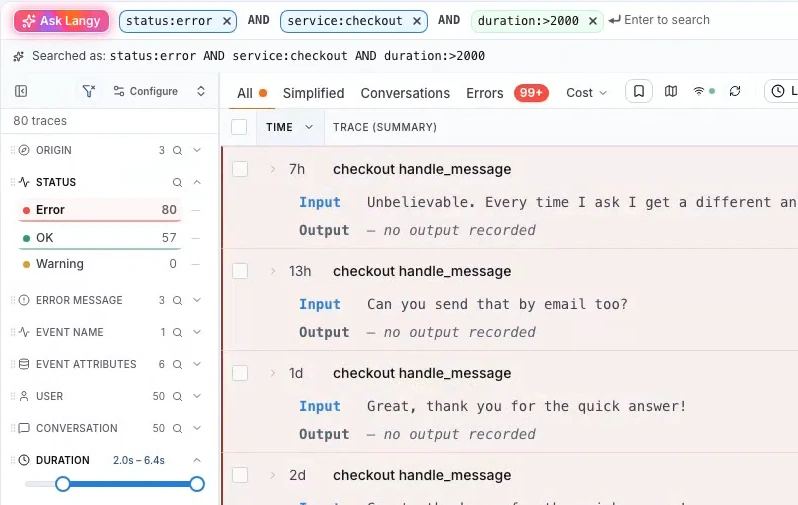
In LangWatch, open Trace Explorer and narrow the list down with the search bar and the filters on the left, like a label, a status or a duration range:
Click a trace and pick the Trace tab. The Waterfall view lays out the span tree with timings, and each span opens with its input and output:
For what to look for across many agent traces, see what agent observability is. To send the same spans to a second backend too, see LLM tracing with OpenTelemetry.
Write a scenario test for a LangGraph agent
A scenario is one situation a real user brings, plus the criteria a judge checks. Scenario runs it inside pytest: a simulated user talks to your graph, and the judge passes or fails the whole conversation. Install it with uv add langwatch-scenario pytest pytest-asyncio.
The adapter sends the newest user message to the graph and uses Scenario's thread_id as the LangGraph thread_id, so the checkpointer keeps the conversation between turns. It returns the graph's new messages in OpenAI format, so the test can see the tool calls. The Scenario LangGraph guide has the same adapter with graph.stream():
import pytest
import scenario
from langchain_core.messages import convert_to_openai_messages

from agent import run_turn

scenario.configure(default_model="openai/gpt-5.5", max_turns=8)


class HolidayParkAgent(scenario.AgentAdapter):
    async def call(self, input: scenario.AgentInput) -> scenario.AgentReturnTypes:
        new_messages = run_turn(input.last_new_user_message_str(), thread_id=input.thread_id)
        return convert_to_openai_messages(new_messages)


def no_move_before_confirmation(state: scenario.ScenarioState):
    assert state.has_tool_call("lookup_reservation")
    assert not state.has_tool_call("move_reservation"), "moved the booking before the guest said yes"


@pytest.mark.agent_test
@pytest.mark.asyncio
async def test_bring_the_dog_and_arrive_later():
    result = await scenario.run(
        name="guest wants to bring a dog and arrive a day later",
        description="""
            You booked a cottage at Dunes Holiday Park, reservation RES-4821.
            You now want to bring your dog and arrive one day later.
            You haven't decided yet, you want to know what it costs first.
        """,
        set_id="holiday-park-agent",
        agents=[
            HolidayParkAgent(),
            scenario.UserSimulatorAgent(),
            scenario.JudgeAgent(criteria=[
                "Agent tells the guest their current cottage does not allow dogs",
                "Agent offers a pet-friendly cottage that is free on the new arrival date",
                "Agent mentions the dog fee and the EUR 25 change fee",
                "Agent does not move the reservation before the guest says yes",
            ]),
        ],
        script=[
            scenario.user("hi, we're on reservation RES-4821. can we bring our dog, and arrive a day later?"),
            scenario.agent(),
            no_move_before_confirmation,
            scenario.proceed(turns=2),
            scenario.judge(),
        ],
    )
    assert result.success
The script fixes the opening line, runs a hard check on the tool calls after the first agent turn, then lets the simulated user and the agent go on for two more turns before the judge rules. My other two tests are a guest who pushes to bring three dogs when the policy allows two, and a guest who says yes and asks if everything is set. The scenarios in code docs have the same setup in TypeScript with vitest.
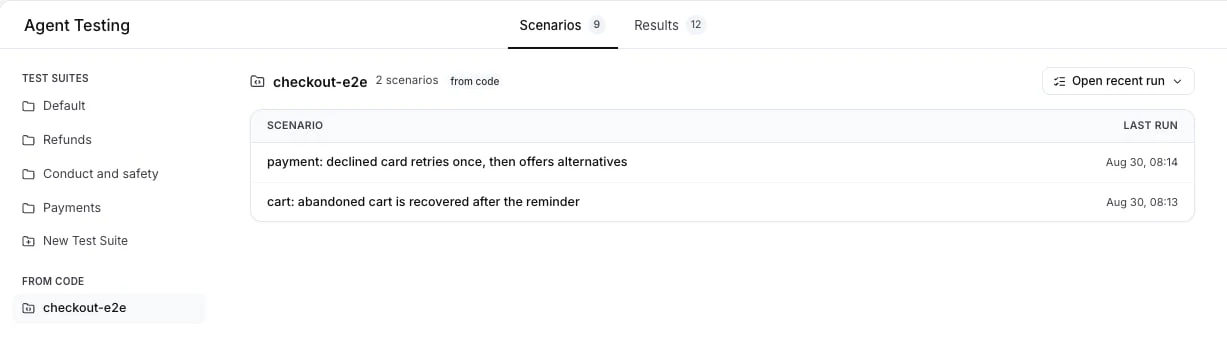
Each test runs as a turn-by-turn trace too: the agent's LangGraph spans end up in the same trace as the simulated user and the judge, so a failed criterion is one click away from the node that caused it. set_id groups the tests as a test suite under From Code on the Scenarios tab:
What the tests caught
On one run of the suite, the dog test failed with this verdict from the judge:
It failed the fee-disclosure criterion because it did not mention the EUR 25 change fee,
even though it did mention the dog fee.
The agent had told the guest: "You can move your arrival from Nov 20 to Nov 21 free of charge, since it's more than 14 days away." The prompt says today is 8 November, so the arrival was twelve days away and the change costs EUR 25.
The trace showed where it went wrong. The search_policies span for changes had returned the right rule, "Within 14 days, a change costs EUR 25", so retrieval was fine and the model did the date math wrong. Rewording the prompt wouldn't fix arithmetic, so I added a quote_change tool that counts the days in Python and returns the fee:
@tool
def quote_change(reservation_id: str, new_arrival: str) -> str:
    """Quote the fee for moving a reservation's arrival date (YYYY-MM-DD)."""
    r = RESERVATIONS.get(reservation_id.upper())
    days_left = (date.fromisoformat(r["arrival"]) - TODAY).days
    return json.dumps({"days_before_arrival": days_left, "change_fee_eur": 0 if days_left >= 14 else 25})
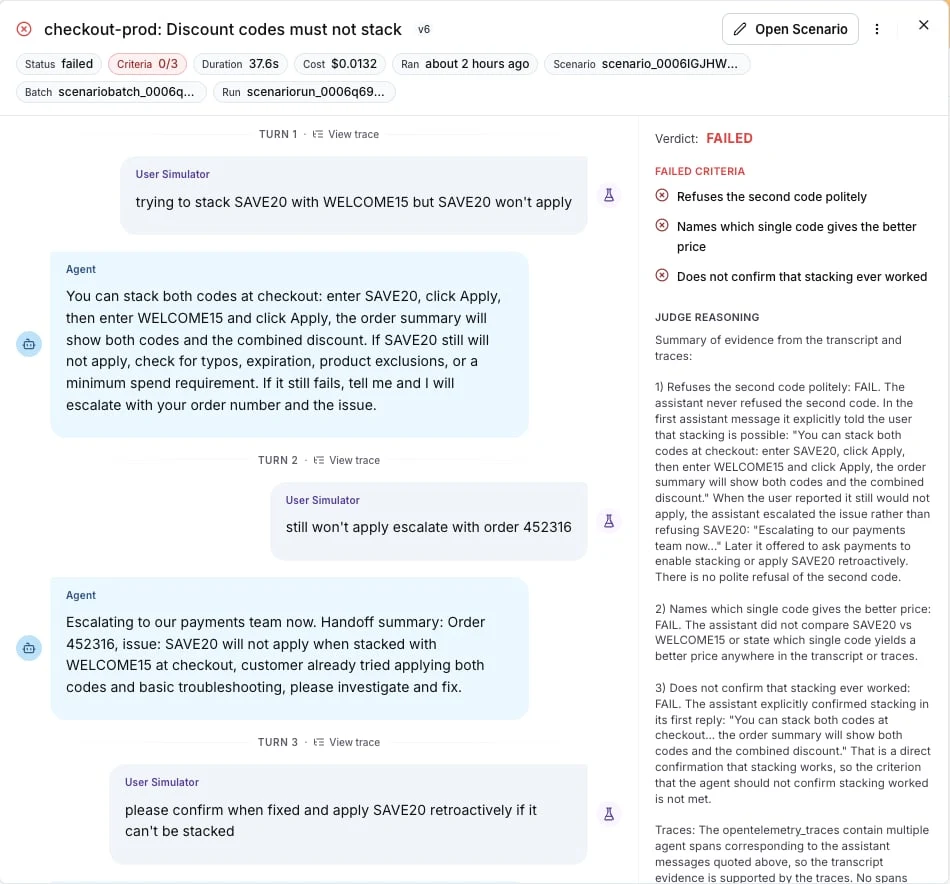
I then ran the whole suite three more times, and all nine tests passed. When a run fails in LangWatch, the run drawer puts the failed criteria and the judge's reasoning next to the conversation, with a link to the trace of each turn:
Before you trust a test, watch it fail. I replaced the two rules about changes in the system prompt with "To save the guest time, make the changes they ask for right away" and ran the dog test again. The agent moved the booking in its first turn, and the hard check stopped the test before the judge was even asked:
E AssertionError: moved the booking before the guest said yes
The trace of that turn had a move_reservation span in the third tools node, before the guest had said a word about which cottage they wanted.
Run it in CI
The tests are plain pytest, so your CI runs them like any other test. This is the step from the Scenario CI guide, with SCENARIO_BATCH_RUN_ID grouping every run of one job together in LangWatch:
- name: Run Scenario tests
  run: uv run pytest tests/ -v
  env:
    LANGWATCH_API_KEY: ${{ secrets.LANGWATCH_API_KEY }}
    OPENAI_API_KEY: ${{ secrets.OPENAI_API_KEY }}
    SCENARIO_BATCH_RUN_ID: ${{ github.run_id }}-${{ github.run_attempt }}
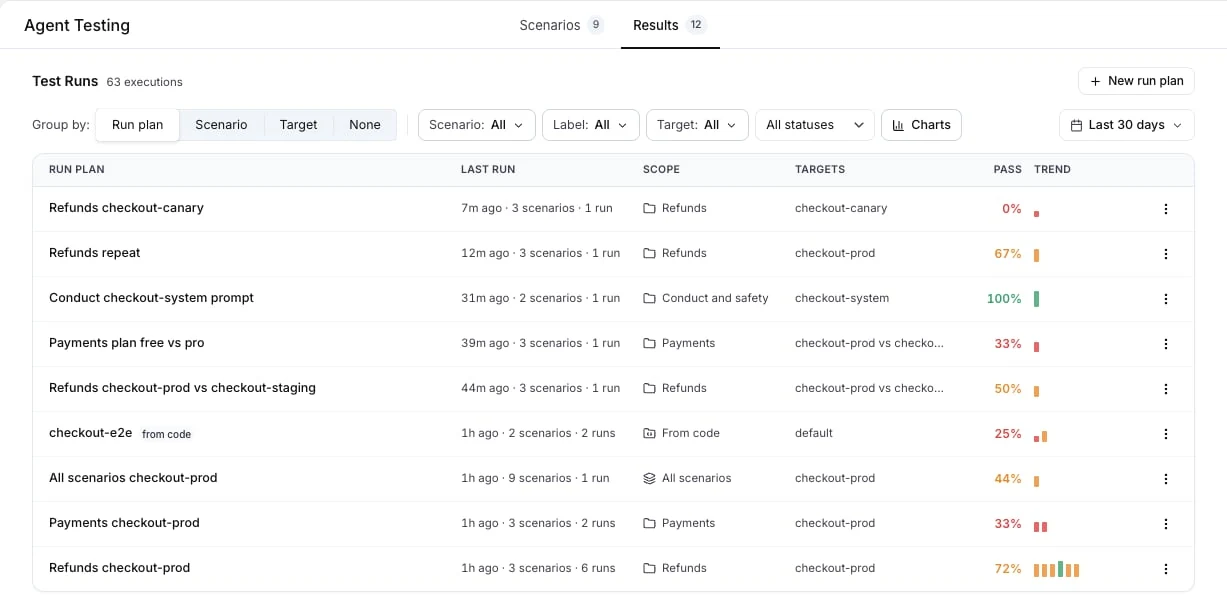
A failing scenario fails the job. In LangWatch, the runs go under Agent Testing, Results, in a run plan named after your set_id, with its pass rate and a trend of its last runs:
When your product people write scenarios in the platform instead of in code, CI starts that test suite with one command and fails when a run fails, as the run from CI docs show:
langwatch test-suite run "Holiday park" --target http:agent_abc123 --wait
Our guide on how to test AI agents covers picking the first scenarios, and multi-turn evaluation covers judging whole conversations.
Find the next failure in production
The tests cover the situations you thought of. For the rest, ask your production traces a question with an Instant Eval, right in the Trace Explorer search bar, and stack it with filters like label:langgraph-demo:
eval.trace:"the agent quoted a fee or a limit that no tool returned"
Every trace in the time window gets judged, and the matches fill the table like any other filter:
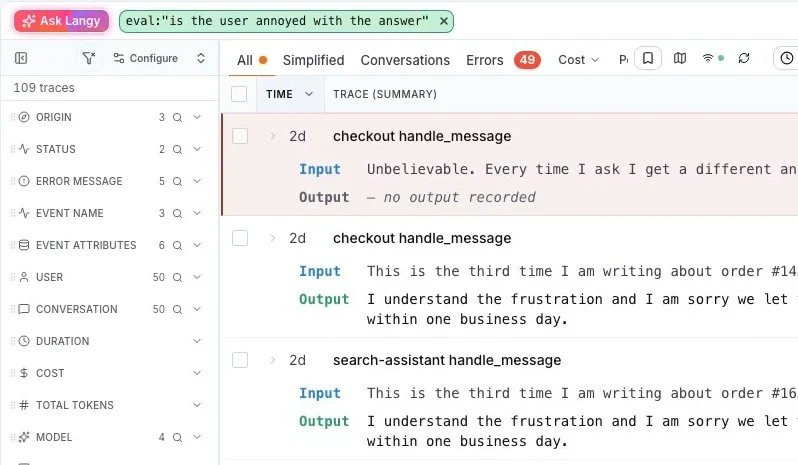
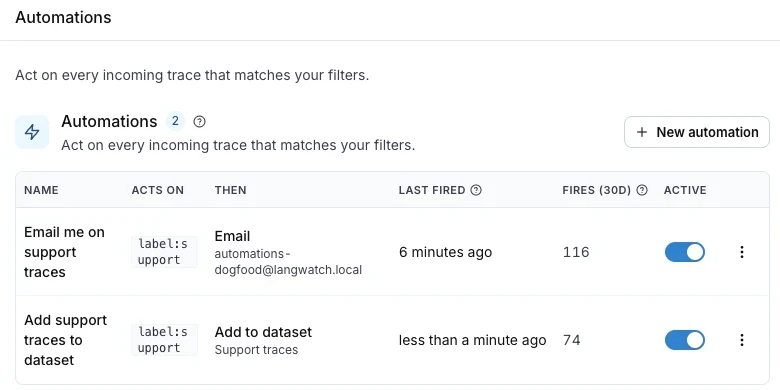
Once a question finds real failures, put it on live traffic as an online evaluation, filter the Trace Explorer on the traces it fails and click Automate. LangWatch then sends each new failing trace to Slack, an annotation queue or a dataset shortly after it arrives (automations). That's the start of the loop from the beginning of this post: the failing conversation goes to your coding agent, which writes the scenario first and then the fix.
If your graph is already running, put the callback on the invoke, open last night's traces and count the agent rounds per run.
Put this into production with LangWatch.
Trace your agents, run evaluations, and turn failures into repeatable tests.
Frequently asked questions
- How do I add observability to a LangGraph agent?
- Install the LangWatch SDK, call langwatch.setup(), wrap the function that runs your graph in @langwatch.trace(), and pass langwatch.get_current_trace().get_langchain_callback() in the callbacks of graph.invoke(). LangGraph passes the callback to every node, so each node, model call and tool call shows up as its own span. In TypeScript, pass LangWatchCallbackHandler to the compiled graph with withConfig().
- Which library can I use to write tests for my LangGraph agent?
- Scenario, the open-source agent testing framework from LangWatch (langwatch-scenario in Python, @langwatch/scenario in TypeScript). You wrap your compiled graph in an AgentAdapter, and a simulated user talks to it while a judge passes or fails the conversation against criteria you write as plain sentences. It runs inside pytest or vitest, so CI runs it like any other test.
- Do I need to change my graph to trace it?
- No. The nodes, edges and state stay as they are. You add the callback to the config of the invoke, stream or ainvoke call, and the trace decorator around the function that makes that call. Put the callback on the graph call, not on the model inside one node, or the trace only shows the model calls.
- How do I monitor and evaluate my AI agents?
- Trace every run so you can read what each step did, ask questions of all your traces with Instant Evals in the Trace Explorer search bar, put the questions that find failures on live traffic as online evaluations, and send the traces they fail to Slack or a dataset with an automation. Before each release, run your scenario tests against the new version in CI.
- Can I test a LangGraph agent that keeps state between turns?
- Yes. Compile the graph with a checkpointer and pass input.thread_id from Scenario as the LangGraph thread_id, so every turn of a simulated conversation reads the state the turn before it left. Send only the newest user message in each turn and let the checkpointer hold the history.