

Available on paid plans. Configuring retention needs a paid plan. On the Free plan every
project keeps data for the platform default of 49 days. Enterprise plans and self-hosted
deployments with a license also get the longer presets and a custom period. Retained data over the
plan volume is billed per extra GB, see the pricing page.
What retention covers
A retention policy sets a number of days for one scope. Every stored row carries the period it was ingested under, and LangWatch deletes the row after that many days. Changing a period leaves the rows already stored on their old period, unless you apply the change to existing data. The policy covers three categories of data:
LangWatch resolves each category on its own. A project takes its traces period from the closest policy that sets traces, and its scenarios period from the closest policy that sets scenarios, so the three can differ. The settings page writes all three categories together, so a policy you add there starts with the same period for all three.
Data stored in Postgres is not covered: annotations, datasets, prompts, and the settings pages keep their rows.
The LangWatch AI Gateway spend records are outside retention. They keep a fixed 13-month lifetime, so you can reconcile invoices after the traces behind them are gone.
Scopes
Write a policy at the organization, a team or a project. For each category a project uses the most specific policy: its own, then its team’s, then the organization’s, then the platform default of 49 days. The Data Retention panel at the top of the page shows the period that applies to the current project, and Data Storage shows how much space the projects you can see use today. The All you can see filter narrows the table to one scope.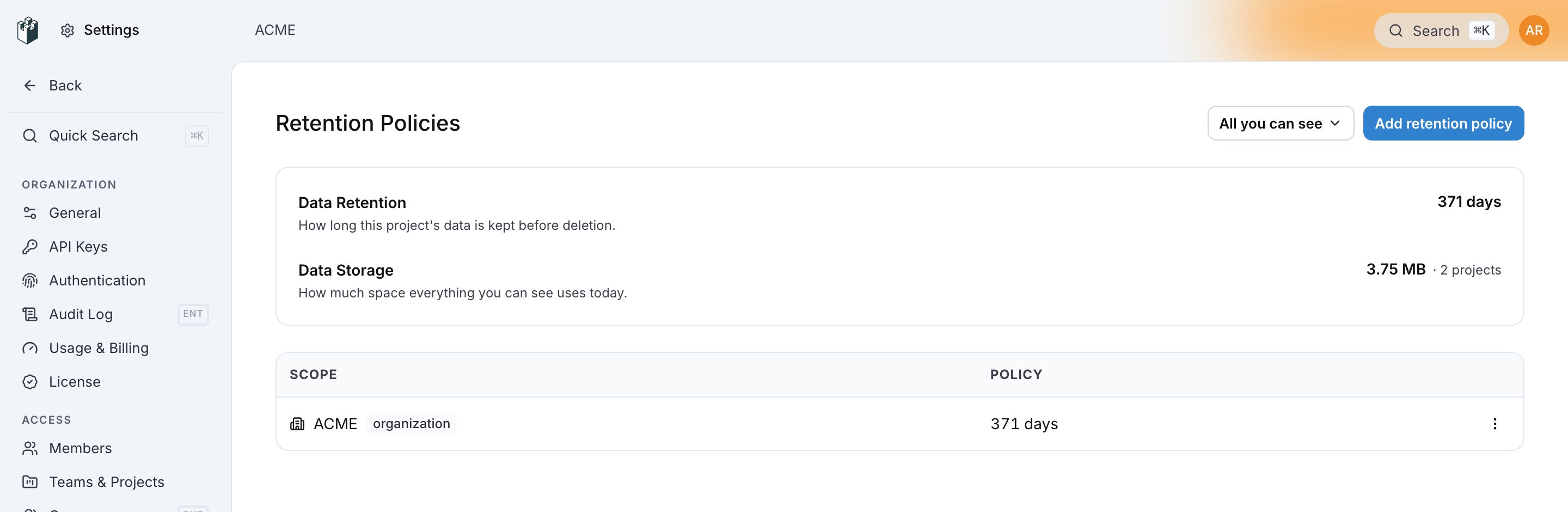
Periods
Periods are whole weeks. The presets round up so that the label is always covered:
The longest period is 65,534 days.
Add a policy
Open Settings > Data Retention. Reading the page needsproject:view. Writing a policy needs organization:manage for the organization, team:manage for a team and project:update for a project. The scope picker only offers the scopes you can write.
1
Click Add retention policy
The drawer opens with the Scope picker and the Retention select.
2
Pick one or more scopes
The picker is multi-select. One Create writes the same period to every scope you pick.
3
Pick the retention period
Choose a preset, or Custom… on Enterprise and self-hosted, and enter an amount and a unit.
4
Decide about existing data
Apply this change to existing data is off by default. Off: the period applies to data
ingested from now on. On: LangWatch also restamps the rows already stored for the current
project, and rows older than the new period become eligible for deletion.
5
Click Create
The policy appears in the table. The row menu has Edit, which reopens the drawer with the
scope locked and saves with Save changes, and Remove, after which the scope falls back
to the next policy in the chain.