

What are Run Parameters
A run parameter is a named value that a run supplies. Two things declare parameters: a scenario, so its text and its criteria read the value, and a connected agent, so the code under test receives it. The scenario text and the target configuration read a value as{{ params.NAME }}. You supply the values when you start the run, from the platform, the API, the CLI or an SDK.
For example, a scenario that tests subscription cancellation can declare a plan parameter, so one scenario covers each plan’s policy:
Situation
Criterion
When to use parameters
- Plans and tiers. One cancellation scenario, run for
freeand run forenterprise. - Test accounts and fixtures. Point the run at seeded data with
--param fixture=order-1042. The agent under test answers from that account, and the criteria can name its facts. - Regions, tenants and languages. The same conversation against
eu-centralandus-east, or against two tenants of your product. - Values your agent’s API needs. An HTTP target puts
{{ params.NAME }}in its URL or request body, so your endpoint receives the value on every request.
Declare the parameters on the scenario
Open the scenario and click Parameters, next to Labels at the bottom of the editor. Add one row per parameter: a name, an optional description, and an optional default value.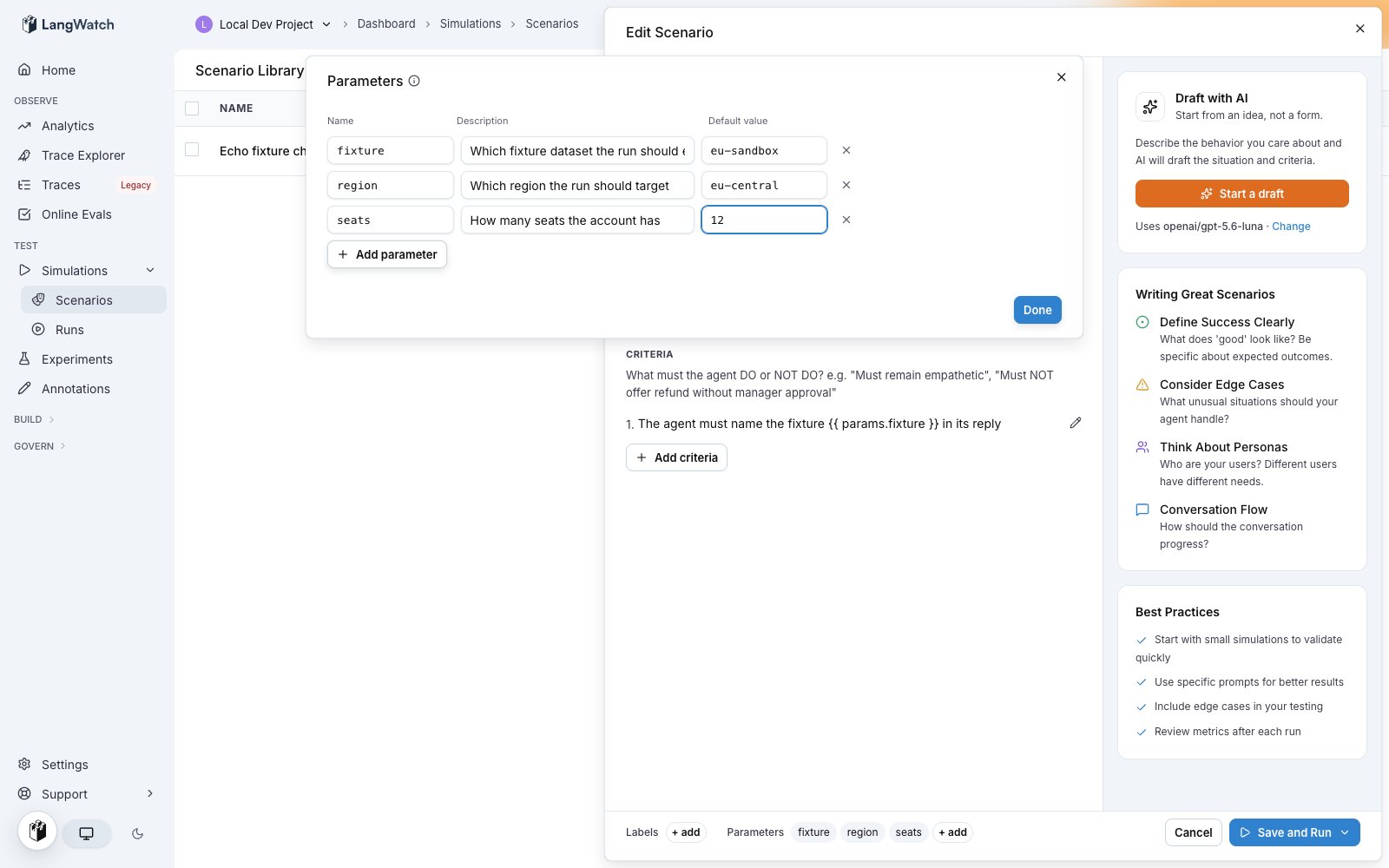
- Name is what
{{ params.NAME }}reads. Letters, digits and underscores, and the first character is a letter or an underscore. - Description appears beside the field when someone starts a run.
- Default value applies when the run does not set the value.
42is a number,trueis a boolean, and everything else is text. Quote a value to force text:"007". - Secret makes the value a credential. See Secret parameters.
POST /api/v1/scenarios and PATCH /api/v1/scenarios/{id} take a parameters array of { name, description, defaultValue, secret } objects.
Parameters declared by the agent
A connected agent declares its parameters in the code, from the function that runs it. The platform reads them when the agent connects, so the declaration is the code and no second copy needs to be kept in step by hand.- Python
- TypeScript
secret parameter. An agent declaration adds two fields the code makes available:
type, one ofstring,numberorboolean. It comes from the annotation in Python and from the schema property in TypeScript. The value reaches the run with that type, so a string parameter keeps007as text instead of turning it into the number 7.options, a closed list of allowed values, up to 50. It comes fromLiteralor anEnumin Python and fromz.enumin TypeScript.
How the run dialog offers them
The parameter fields in the run dialog read every declaration in scope: the scenarios of the run, and the agent behind each target.- The key field suggests every declared name, with its description, its default and where it was declared.
- The value field offers the options when the parameter has a closed list, and the default otherwise.
- Free text always commits. The server refuses what is invalid when the run starts.
- The compare rows offer the selected agent’s own options, so running one agent on two models is two choices from a list.
Names are checked per target
A run with two targets checks each name against the scenarios of the run plus that target’s own agent. A name the new agent declares and the old one does not is accepted for the new target and refused for the old one, with the target named in the message. That keeps a comparison run from failing as a whole because one side does not know a parameter yet.A value outside the options is refused
A value that is not in a closed list is refused before anything is scheduled, withscenario_parameter_option_invalid. The message names the parameter and lists the accepted values.
A parameter with no default that the run does not supply is refused too, with the name in the message. A parameter the run does not supply and that has a default takes the default.
Secret parameters stay scenario-declared. An agent does not declare a secret parameter, because a credential belongs to the project’s secret store rather than to a function signature.
Use the values in the scenario text
The situation and the criteria read a value as{{ params.NAME }}, as in the example above. Both render before the run starts, so the simulated user acts on the value and the judge scores against the same value.
A scenario with no declared parameters is not a template. Its text does not render, so {{ or {% in prose stays exactly as written. Declaring a parameter turns the scenario text into a template.
Use the values in the target
Connected agents
The function receives the values the run supplied, with the type it declared. A parameter the run did not supply arrives as its default, so the function signature is complete on its own. A direct call from a unit test passes no run parameter arguments when every run parameter has a default. The turn fields, such asmessages, are still required.
HTTP agents
The URL, the header values and the body template render against the run’s values. Use a value to pick an endpoint, a query string, a header, or a field in the request body:URL
Body template
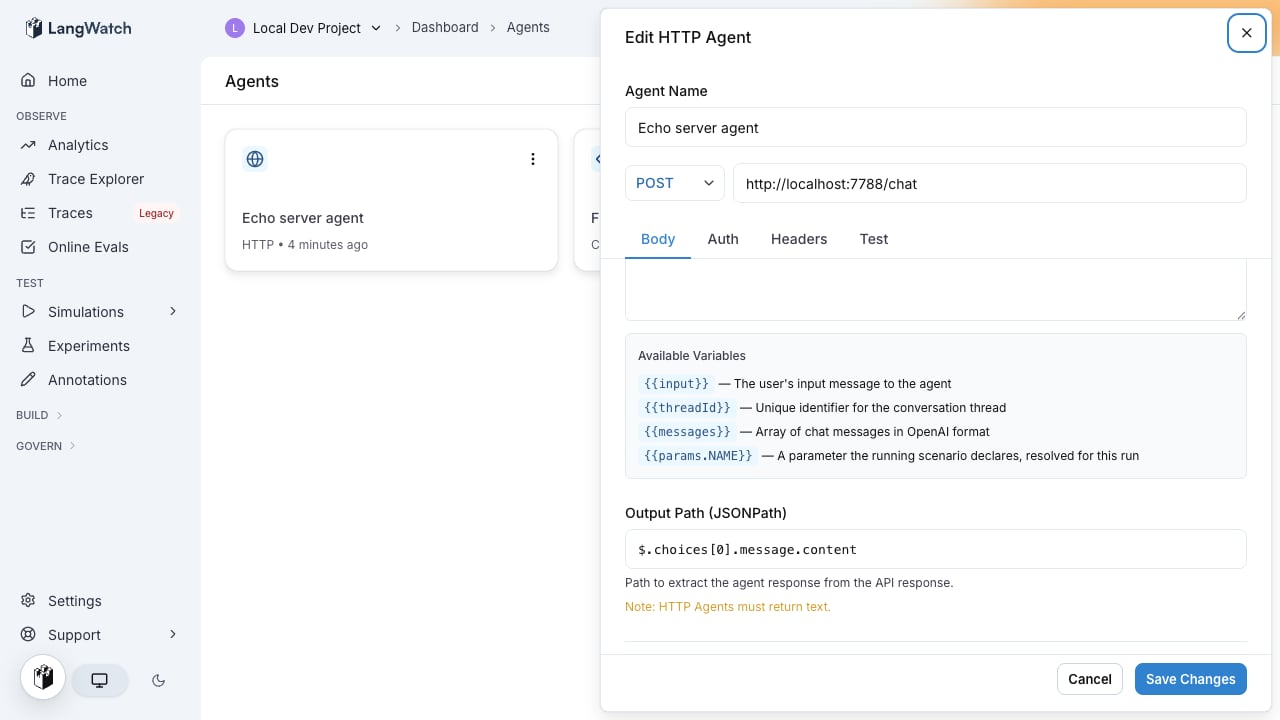
params, the same fields render {{ messages }}, {{ input }} and {{ threadId }} from the conversation, and {{ traceId }} and {{ traceparent }} from the turn’s trace context. See Linking your traces for what the trace variables carry.
Prompt targets
A prompt target renders{{ params.NAME }} in its prompt template before the model call.
Code agents
A code agent reads the injectedparams namespace, next to the secrets namespace. Values keep their type: a boolean arrives as a bool and a number as a number.
params into the module globals. Do not import a module named params, and do not assign over it. When a run resolves no parameters, params is undefined and params.plan raises NameError, the same behavior as secrets.
Workflow targets
A workflow target receives the values as entry inputs, one entry input per parameter name.A parameter reaches a downstream node only if the entry node has an edge carrying it. Adding a
parameter to the run does not add the edge. Open the workflow and connect the new entry field to
the node that reads it.
params.NAME with the original type.
Set the values when you start a run
A value set at run time overrides the scenario’s default. A parameter with no run-time value uses its default.In the platform
Running a test suite opens a confirmation dialog with one field per parameter, prefilled with the defaults. Edit a field to change the value for that run; the scenario keeps its defaults.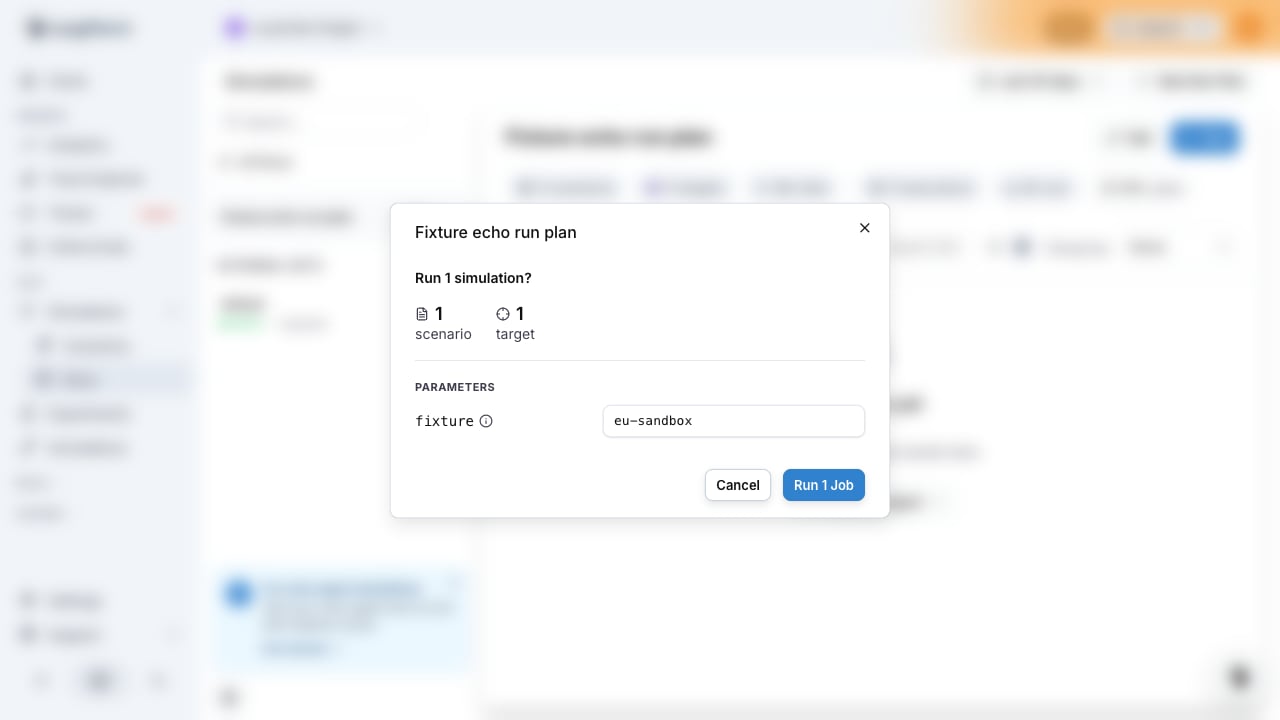
With the CLI
--param key=value repeats once per parameter:
true and false become booleans. A plain number like 42 becomes a number. 007 and 1.50 stay text, because their number form would change the digits. Repeat a name and the last value wins.
With the API
POST /api/v1/test-suites/{id}/run takes a parameters object. Values are strings, numbers or booleans:
POST /api/v1/run-plans/run takes the same parameters object beside its config.
The response carries the batch id that the scheduled runs share:
With the SDKs
- Python
- TypeScript
Secret parameters
A secret parameter is a run parameter that carries a credential. The platform encrypts the value before it writes anything down, and keeps it out of the stored run, the APIs, the exports, the audit log and everything it displays. The target under test reads the value while the run executes, which is the purpose of the parameter. Use one for an API key, a bearer token, or a password that changes per run. Declare it in the same editor: add the row, then turn on the Secret switch. A secret parameter takes no default value, so the field for it is empty and disabled. Supply the value when the run starts, in the run dialog, the CLI, the API or an SDK. The run does not start without it. A target reads a secret as{{ secrets.NAME }} in HTTP configuration and as secrets.NAME in code. It never reads it as params.NAME. The situation and the criteria cannot read it at all, because the platform records the scenario text with the run.
For example, a scenario that tests a tenant API declares api_token as secret, the HTTP target sends it as a header, and each run supplies the token of the tenant it targets:
Header value
api_token. The value stays encrypted until the platform builds the request to the target, and it keeps no readable copy of it: the value is not in the stored run, the runs API, the CSV export or the audit log. The run detail drawer lists the name with a mask.
A run value takes the place of a project secret of the same name, for that run only. The project secret keeps its value for every other run.
Also check: Testing agents behind authentication, for a credential that stays the same across runs.
Limits
When a run is rejected
The platform runs these checks before it schedules any jobs. A rejected run schedules no job at all.
Where the values are recorded
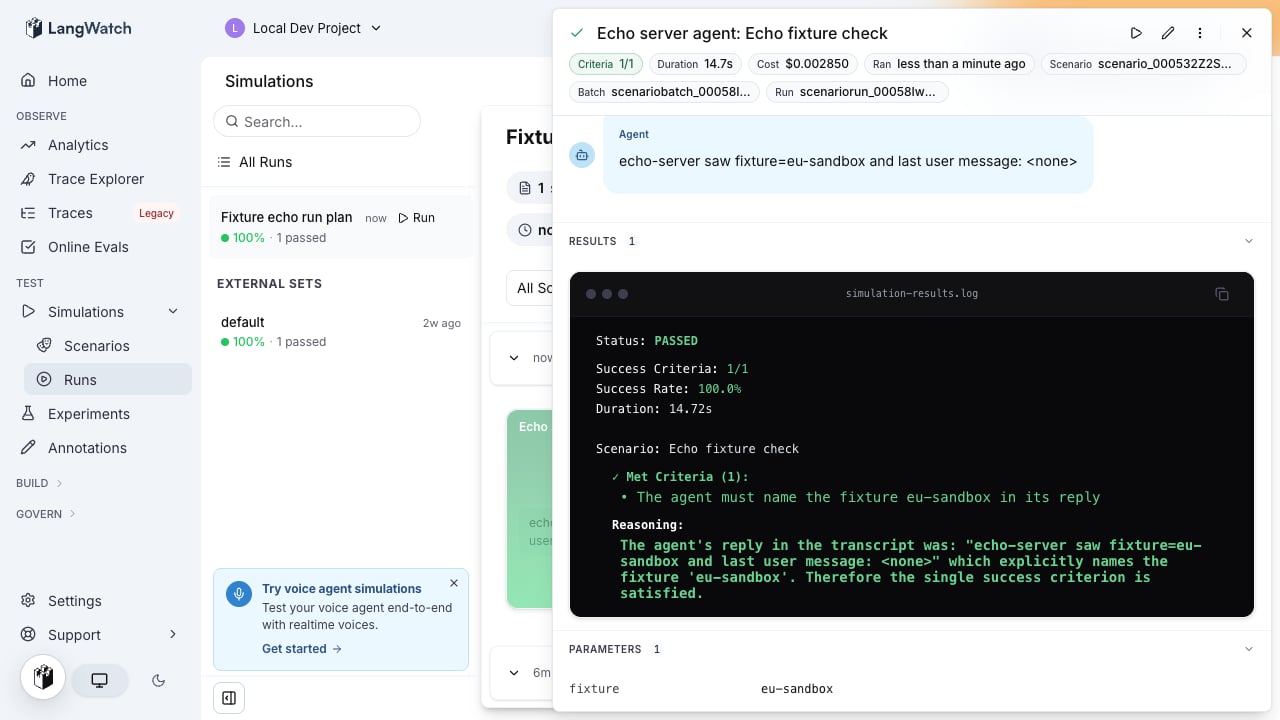
- The run detail drawer shows the values under Parameters, one row per name. A secret parameter appears as its name with a masked value.
- The CSV export writes them as one JSON object per run: the
parameterscolumn in a criteria export, therun_parameterscolumn in a full export. Secret parameters are left out.
Next steps
Authenticated agents
Reference project secrets from an HTTP target or a code agent
Simulations getting started
Create a scenario, add a target, and run your first simulation
Command line interface
Every run command and its flags
Run from CI
Start a test suite from a CI job and wait for the batch