

When to attach an evaluator
The judge grades behavior from the criteria. An evaluator adds a check the evaluator library already does well: whether the answer of a RAG agent is faithful to the contexts it retrieved, a score for the clarity of the answer, a PII scan of the transcript, or a comparison against a golden answer the scenario carries. Any evaluator of the project can be attached, LLM judges included. For a golden answer, the test suite declares fields, for examplereference_answer, and each scenario carries its value. A blank value skips the evaluators that read it.
Attach an evaluator
Edit suite opens the suite editor. Under Customize test suite, Add evaluator lists the evaluators of the project, and picking one attaches it with its mappings inferred. When a required input is still unmapped, or the evaluator reads an expected value, the drawer opens on the attachment so you confirm each mapping.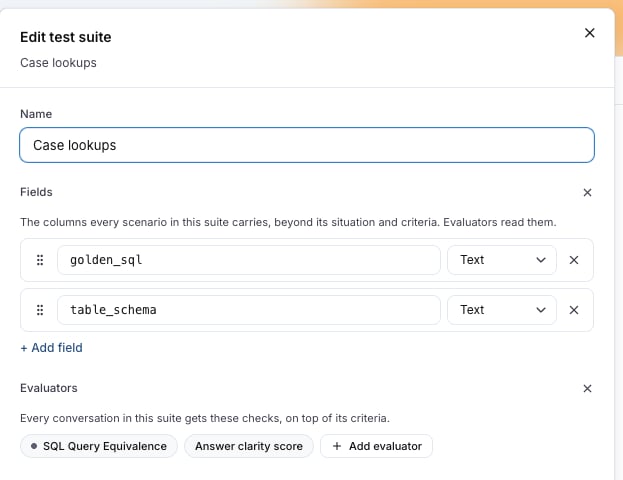
Mappings
Every evaluator input reads from one source:
Mappings are inferred from the input names:
input, question or user_input reads the first user message; output, response or answer reads the last agent message; transcript, conversation or messages reads the transcript; contexts or retrieved_contexts reads the trace’s contexts. So a faithfulness evaluator on a RAG agent needs no mapping at all once its traces are linked.
An expected_* input reads a suite field: the field with the same name, otherwise the one field whose name shares a word with the input. expected_output also takes golden, answer, sql, query, label or target, and expected_contexts takes schema, context or table. A suite with a single field maps it regardless, and two matches leave the input for you to pick in the drawer. A tool call or the spans are never inferred: set them by hand.
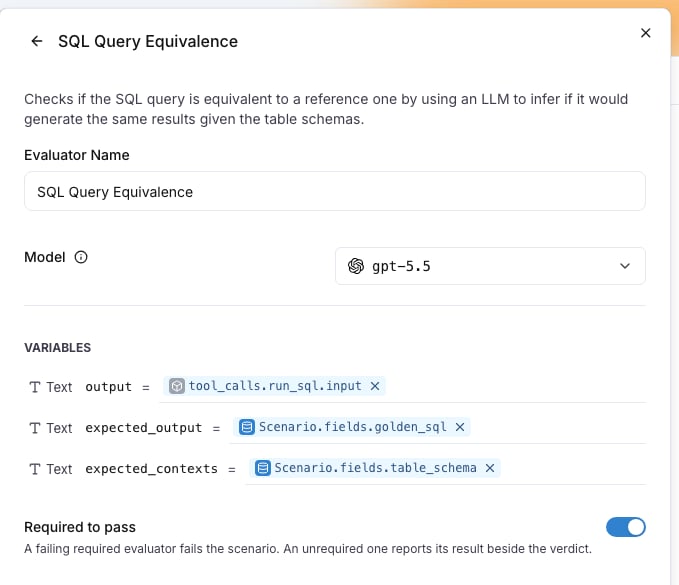
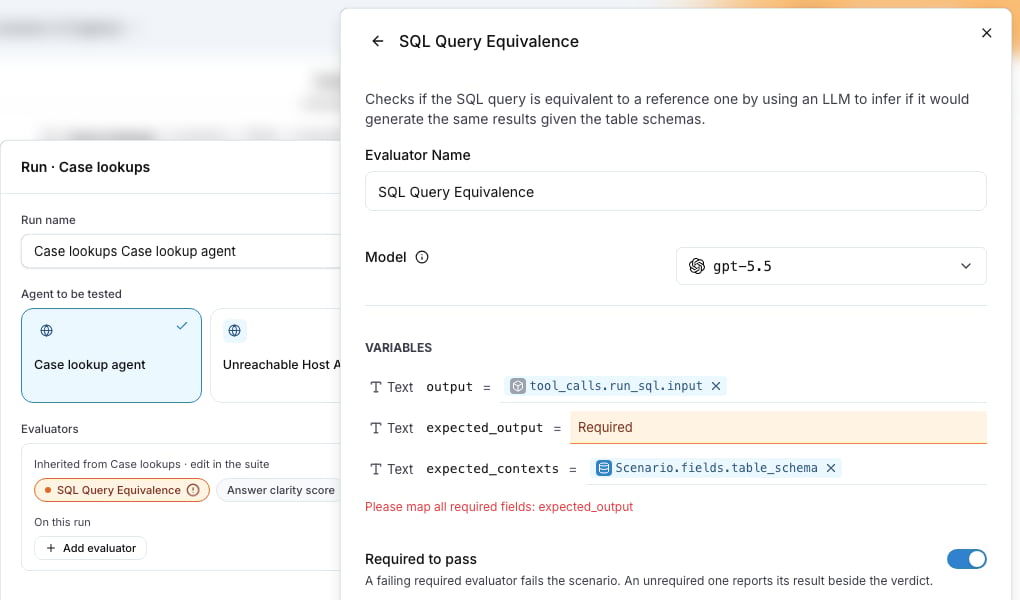
output from the run_sql tool call and the two expected inputs from the golden_sql and table_schema fields, one mapping per input under Variables. spans hands an evaluator the whole run, every span of every trace as JSON, when one tool call at a time is not enough.
Required evaluators and scores
Required to pass makes a failing result fail the scenario. It is on by default for an evaluator with a pass or fail verdict. A score-only evaluator, such as an answer clarity score, reports beside the verdict and never gates.What each run reports
After the judge, every attached evaluator runs and the run keeps one result per evaluator:
Between the judge’s verdict and the evaluator results the run reads
Evaluating, and langwatch test-suite run --wait treats it as still going. A required evaluator that never ran fails the run instead of leaving it pending. The run header shows one pill per evaluator with its pass rate or its mean score, and the run drawer lists the rows under the criteria. See Results.
Evaluators on a run plan
The run dialog lists the evaluators inherited from the test suites in scope, and Add evaluator under On this run adds one to the plan itself. A plan evaluator reads the conversation and the trace only, because a plan may cover suites with different fields. Use it for a check that applies to every scenario, such as a PII scanner.Step by step: a golden answer on every scenario
The screenshots follow a text-to-SQL suite, where the golden answer is a query and the evaluator is SQL Query Equivalence. The steps are the same for any evaluator that compares against a field, such as a reference answer on a RAG agent.1
Declare the fields on the suite
On the Scenarios tab, press Edit suite and, under Customize test suite, Add fields. Add one field per value the evaluator compares against, here
golden_sql and table_schema of type Text, then Save. The editor of every scenario in the suite now asks for them.2
Give each scenario its values
Open a scenario with Edit in its row menu. After the criteria, the editor shows one box per field. Fill them and Save. A blank value is allowed: the evaluators that read it are skipped for that scenario.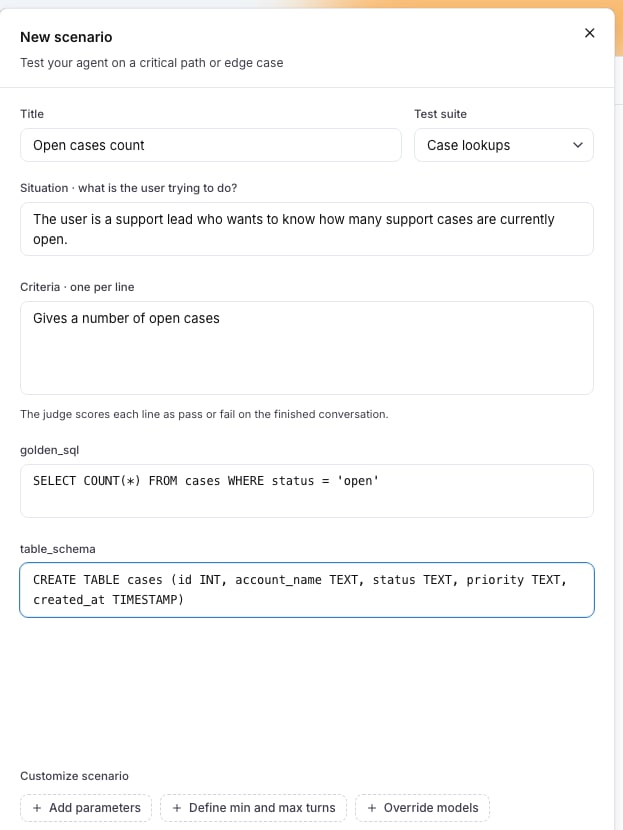
3
Attach the evaluator and confirm its mappings
Back in the suite editor, press Add evaluator and pick the evaluator. The drawer opens with the expected inputs inferred from the fields. Here
output has to read the query the agent ran rather than its reply, so change it to the Trace source, tool call run_sql, input. Leave Required to pass on and press Save Changes, then Save on the suite.A score-only evaluator, such as an answer clarity judge, is attached the same way. Its switch is disabled with Scores report, they do not gate.4
Run the suite
Press Run suite, pick the agent and press Run N scenarios. The dialog lists the inherited evaluators, and Add evaluator under On this run adds a check for this run only. While the evaluators run, a row reads 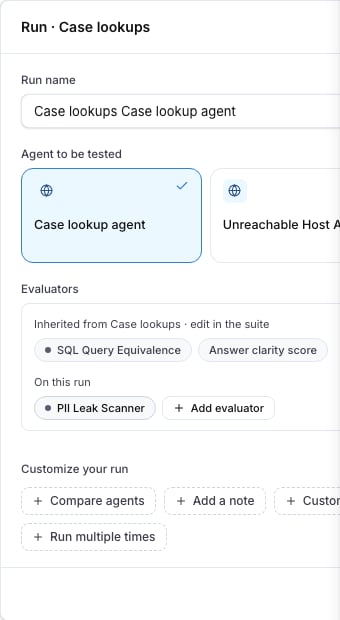
Evaluating in the Result column and Grading in the Evaluators column.5
Read the results
The run header shows one pill per evaluator, and every row shows one pill per evaluator with its verdict, its score or 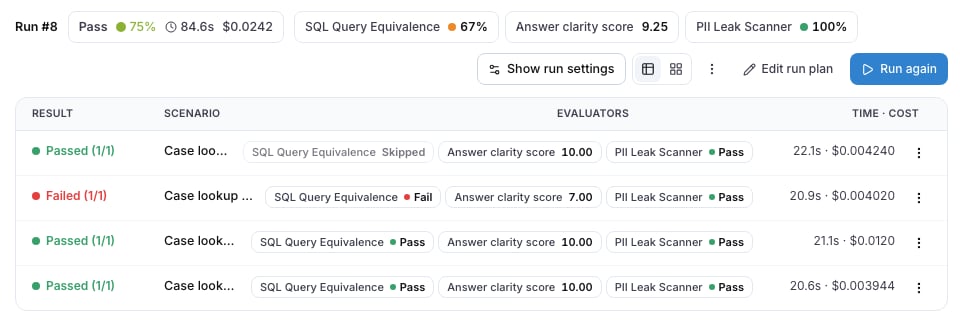
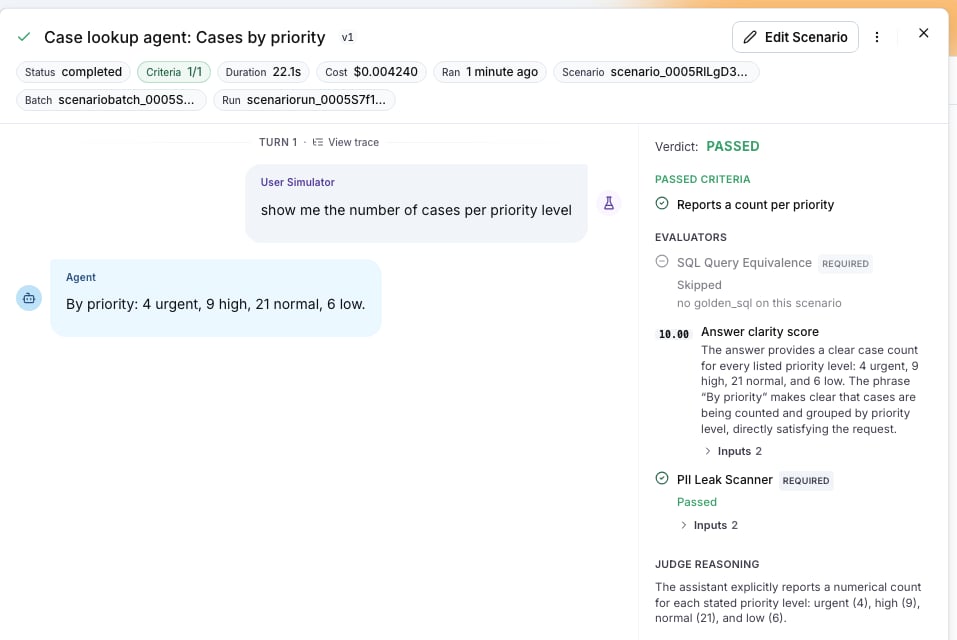
Skipped. Press a row: the drawer lists the evaluators under EVALUATORS, below the criteria, with the REQUIRED mark, the explanation and the Inputs it compared. A run the required evaluator failed reads Verdict: FAILED · SQL Query Equivalence, with the judge’s criteria kept.Troubleshooting
The evaluator was skipped
The scenario has no value for the field the mapping reads. The reason names it, for exampleno golden_sql on this scenario, and the run keeps the judge’s verdict. Fill the field, then Rerun this scenario from the row menu.
Run suite opens the evaluator drawer instead of running
A required input has no mapping. The chip shows an amber alert, and Run opens the drawer on that evaluator withPlease map all required fields: expected_output. Map the input, press Save Changes and run again. The API refuses the same run with suite_evaluator_mappings_missing.
The evaluator failed with a reason about the trace
no run_sql call in the trace, no retrieved contexts in the trace or no spans in the trace means the run’s traces did not hold what the mapping reads. The platform waits for the traces and retries, and on the last attempt records the evaluator as failed, so a required one fails the run.
Check that the traces reach the project and join the run, see Linking your traces, and that the tool name in the mapping is the span name the agent reports.
From the CLI and the API
--evaluator infers the mappings the way the suite editor does. --evaluators-json takes the full attachment list, which is how a tool call mapping is set:
evaluators on POST /api/v1/test-suites, PATCH /api/v1/test-suites/{id} and config.evaluators on POST /api/v1/run-plans/run, and GET /api/simulation-runs/{scenarioRunId} answers with results.evaluations. See the Test Suites API reference and the Run Plans API reference. The Python SDK takes fields and evaluators on test_suites.create, test_suites.update and run_plans.run; the TypeScript SDK takes them on testSuites.create, testSuites.update and, under config, on runPlans.run. The MCP tools platform_create_test_suite, platform_update_test_suite and platform_run_plan take the same.