Documentation Index

Fetch the complete documentation index at: https://langwatch.ai/docs/llms.txt

Use this file to discover all available pages before exploring further.

This is the admin side of Personal IDE keys. Once configured, every developer in your organization can run langwatch login --device and immediately get a working CLI experience — no per-user setup, no IT tickets.

Time budget

The numbers below are hands-on time at the LangWatch admin console — not net of organisational approvals.
PathHands-on timeNet of approvals
Self-serve (existing email signup, no SSO yet)~5 minutes~5 minutes
With Okta / Azure AD / Google Workspace SSO~30 minutesDays, depending on IT / security review of a new SAML or OIDC app
If your IT team is the bottleneck, you can start on the self-serve path today (skip §1 below) and add SSO later — the providers, routing policies, and budgets you set up keep working unchanged when SSO drops in.

Before you start: brand-new to LangWatch?

If this is your first LangWatch session — sign up at /auth/signup. The post-signup flow routes you to /onboarding/welcome to create your organization (name + ToS) and pick a flavor (Platform / Coding Agent / MCP / Manual). Once that completes, you land at your first project, and this guide picks up from there. The bootstrap creates: your Organization, a Personal Team membership, an Owner RoleBinding on the org, and your first Project — everything subsequent steps assume is already in place. If you already have a LangWatch account on the org you’re configuring, skip to §1 below.

Prerequisites

  • Organization owner or admin role at LangWatch.
  • Workspace API keys for the providers you want to make available (one each from Anthropic, OpenAI, Gemini, Azure, Bedrock, Vertex — whatever your team needs).
  • Your IdP’s SAML metadata or OIDC discovery URL (Okta, Azure AD, Google Workspace, Auth0).
Governance is currently behind a preview flag. The /governance UI surface (and the Govern main-menu entry) require the release_ui_ai_governance_enabled flag enabled for your org.
  • Self-hosted: set FEATURE_FLAG_FORCE_ENABLE=release_ui_ai_governance_enabled in your LangWatch app environment, restart, and the menu + routes are visible to every admin.
  • SaaS: contact your LangWatch account rep — we’ll enable the flag for your org.
The CLI surface (langwatch login, langwatch open, langwatch claude, etc.) is always available once you install the CLI — no env flag needed. Server-side authorization handles per-account governance entitlement.Once the flag is on, fresh admins can reach /governance even with no project created yet — governance is org-scoped, not project-scoped.

1. Connect SSO

In Settings → SSO, click Connect identity provider.
  1. In Okta admin, create a new SAML 2.0 application.
  2. Single sign-on URL: https://app.langwatch.ai/api/auth/sso/{your-org-slug}/callback
  3. Audience URI: https://app.langwatch.ai
  4. Map the NameID to email and add the standard claims (email, firstName, lastName).
  5. Download the IdP metadata XML.
  6. Paste it into LangWatch’s Connect identity provider form.
  7. (Optional) Enable SCIM provisioning so users are auto-created the first time they sign in.
Once SSO is live, anyone with an @yourdomain.com email is auto-routed to your IdP at login. You can disable password authentication entirely from this page if you want SSO-only.

2. Connect providers

In Settings → Model Providers, add an entry per upstream:
  1. Click Add provider and pick from the list (Anthropic, OpenAI, Azure OpenAI, Bedrock, Vertex, Gemini, custom OpenAI-compatible).
  2. Paste the workspace API key (or AWS / GCP credentials).
  3. Set the scope: Organization (everyone), Team (only members of one team), or Project (only one project).
For most orgs starting out, scope at Organization so the credential is available everywhere. You can tighten later by creating team-scoped overrides.
The provider entries here are the same ones the AI Gateway already uses for service virtual keys. Personal keys reuse them — no parallel pool.

3. Define routing policies

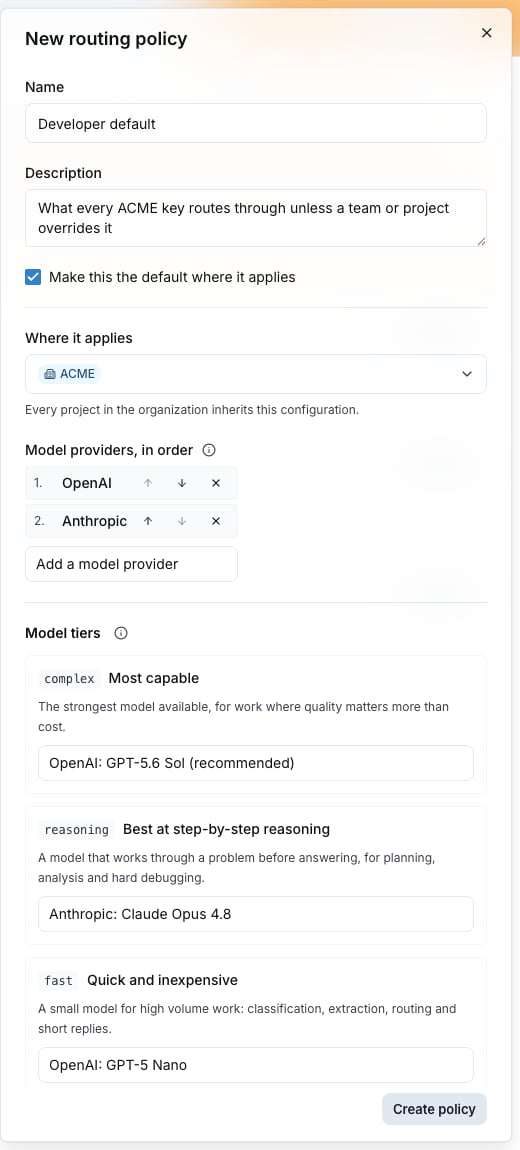
Open AI Gateway → Routing Policies and click New policy. A policy is the answer to “when one of my users wants to call a model, what providers can serve it, in what order?” — see the full reference at Routing policies. Two policies to create on day one:
1

developer-default

  • Scope: Organization
  • Strategy: priority
  • Providers (in order): Anthropic, OpenAI, Gemini
  • Allowed models: claude-3-5-*, claude-3-opus-*, gpt-4o*, gpt-5*, o1-*, o3-*, o4-*, gemini-2.5-*
  • Mark as default for ORG scope
This is what every user’s personal key will reference unless a team-level override exists.
2

evaluator-default

  • Scope: Organization
  • Strategy: cost
  • Providers: OpenAI, Gemini, Anthropic
  • Allowed models: gpt-4o-mini, gpt-5-mini, gemini-2.5-flash, claude-3-5-haiku-*
  • Mark as default for the evaluator system VK (your LangWatch-internal evaluators will use this, keeping eval costs predictable).
Policies cascade: a TEAM-scoped policy with isDefault=true overrides the ORG-scoped default for members of that team.
Smoke-test before you publish the portal: the org-default routing policy MUST have at least one provider in its chain before personal keys can serve traffic. If you publish /me to teammates with an empty developer-default policy, every issued VK provisions successfully but the first call returns 504 provider_timeout (the gateway has nothing to forward to). After §2 (Connect providers) + this section, mint a test key against your own user, fire one completion, and confirm a 200 before announcing the portal.

4. Set per-user budgets

In AI Gateway → Budgets:
  1. Click New budget and pick scope User (default).
  2. Set the monthly cap (e.g. $500/mo).
  3. Click save.
Every personal VK auto-issued by langwatch login inherits this budget. To exempt a power user, override at scope User with a specific user ID and a higher limit. You can also set:
  • Team budgets — cap an entire team’s total spend.
  • Project budgets — cap a production agent’s spend.
  • Org budgets — a hard ceiling for the whole organization.
The gateway enforces the strictest binding — if any scope is exceeded, the request is rejected with a structured error identifying the blocking scope.

5. Roll out to your team

Send your team this snippet:
Welcome to LangWatch! To use AI tools at <YourCompany>:

1. Install: npm install -g langwatch     (or run via npx -y langwatch ...)
2. Sign in: langwatch login
3. Use it:  langwatch claude  (or codex / cursor / gemini)

Dashboard: https://app.langwatch.ai/me
Questions: <#langwatch slack channel>
The CLI ships as an npm package (the only canonical install path); see docs/integration/install.mdx for full prerequisites and self-hosted endpoint configuration. That’s it. The first time each user runs langwatch login, the backend auto-provisions their personal team + project, mints a personal VK against the developer-default routing policy, and returns it in the same round-trip. They have a working CLI in under a minute.

What you’ll see as users come online

In AI Gateway → Activity:
  • Per-user request counts and spend, in real time.
  • A By tool breakdown (Claude Code vs Codex vs Cursor).
  • A By model breakdown.
  • The full audit trail of vk-lw-… issuance, langwatch login events, budget violations, and policy denials.
In Settings → Members:
  • A list of every user with their personal team auto-created.
  • Per-user budget ceiling and current spend.
  • A Revoke all credentials button per user — useful for off-boarding.

Off-boarding flow

When someone leaves:
  1. Disable them in your IdP (this is what your IT process already does).
  2. The next time the LangWatch SCIM sync runs (or when their access token expires, ~1h), their credentials are dead.
  3. (Optional, for immediate revocation) In Settings → Members, click Revoke all credentials for the user. This invalidates their refresh token and any active access tokens within 60s.
Their personal team and traces stay in the audit log for compliance, but no new gateway calls succeed.

CLI device-flow REST API (for custom clients)

The langwatch CLI uses a standard RFC 8628 device-code flow against the control plane. Self-hosters who need to integrate custom CLI clients, or audit the wire surface, can hit these endpoints directly. The format is snake_case JSON (matches RFC 8628 + every other OAuth library). Origin enforcement applies to all endpoints — pass Origin: <your-base-url> from any client outside a browser.
EndpointPurposeSuccessNotable error states
POST /api/auth/cli/device-codeMint a device-code + user-code pair200 JSON { device_code, user_code, verification_uri, verification_uri_complete, expires_in, interval }400 invalid_request
POST /api/auth/cli/exchangeLong-poll for approval200 JSON { access_token, refresh_token, expires_in, refresh_expires_in, user, organization, default_personal_vk }428 authorization_pending (keep polling), 408 expired_token, 410 access_denied, 429 slow_down (re-poll too fast — back off)
POST /api/auth/cli/refreshRotate access token200 JSON { access_token, refresh_token, expires_in, refresh_expires_in } (refresh-token rotation — old token is invalidated)401 invalid_grant (CLI must wipe local state)
POST /api/auth/cli/logoutRevoke a refresh-token server-side200 { ok: true } (idempotent)
GET /api/auth/cli/lookup?user_code=...Browser-side: verify a pasted user-code200 { user_code, status, created_at, expires_at }401 unauthorized (user must sign in first), 404 not_found, 410 expired
POST /api/auth/cli/approveBrowser-side: user clicks “Approve”200 { ok, personal_vk_label, organization_id }401 unauthorized, 403 forbidden (caller not in target org), 409 already_resolved
POST /api/auth/cli/denyBrowser-side: user clicks “Deny”200 { ok } (idempotent)401 unauthorized
The browser approval surface is https://<your-base-url>/cli/auth?user_code=XXXX-YYYY (the verification_uri_complete field). Unauthenticated visitors are bounced through SSO and return to the page automatically.

Verified behavior

The reference server passes all of:
  • Each device-code mint returns a unique user_code and device_code
  • user_code is 8 chars, base32 alphabet (no I/O/0/1/L/U), dashed XXXX-YYYY
  • verification_uri ends with /cli/auth
  • expires_in defaults to 600s (configurable), interval defaults to 5s
  • Polling /exchange faster than the per-device rate-limit (4s) returns 429 slow_down
  • Polling with an unknown / TTL-expired device_code returns 408 expired_token
  • /refresh with an unknown / expired token returns 401 invalid_grant
  • All browser-side endpoints (/lookup, /approve, /deny) require an active session cookie; unauthenticated requests get 401 unauthorized with a body the CLI surfaces verbatim
  • /logout is idempotent — passing an unknown / already-revoked refresh token still returns 200 { ok: true }

Try it locally (dogfood loop)

Want to see real spend land in /me/usage and the governance dashboard before rolling out to your team? The repo ships dogfood helpers that mint a personal virtual key and fire a real completion through your local Go gateway. Both feature flags must be force-enabled in langwatch/.env (.env.example ships them in the default block as of e303ec709):
FEATURE_FLAG_FORCE_ENABLE=release_ui_ai_gateway_menu_enabled,release_ui_ai_governance_enabled
Without release_ui_ai_governance_enabled, /governance and /settings/governance/{ingestion-sources,anomaly-rules} render NotFoundScene even for an ORG ADMIN.
# 1. Bring up the stack (postgres + redis + app + gateway)
make dev
make service svc=aigateway   # in a second terminal

# 2. Sign up a persona-4 admin (uses /api/auth/sign-up/email)
curl -X POST http://localhost:5560/api/auth/sign-up/email \
  -H 'content-type: application/json' \
  -d '{"email":"jane@acme.test","password":"...","name":"Jane Acme"}'

# 3. Seed the persona's personal team + project + VK
pnpm tsx scripts/dogfood/seed-personas.ts \
  --email jane@acme.test --persona p4 --mint-vk
# → prints VK secret to stdout (capture it; it's shown once)

# 4. Fire a real completion through the gateway
pnpm tsx scripts/dogfood/fire-completion.ts \
  --vk vk-lw-<...> \
  --model claude-sonnet-4 \
  --prompt "Write a haiku about retrieval-augmented generation."

# 5. Wait ~5s for the trace pipeline, then visit:
#    /me/usage      — see Budget caveat below
#    /governance    — admin's governance home with live activity
The seed-personas.ts helper covers persona 1 (admin), persona 3 (LLMOps majority — no chrome change), and persona 4 (admin who also uses the CLI). Add --mint-vk to the latter two to get a usable personal VK.
Budget caveat for /me/usage: spend is computed from the gateway_budget_ledger_events fold, which only writes ledger rows when a Budget applies to the request. A fresh --mint-vk seed produces a working personal VK but no Budget binding by default, so /me/usage shows $0.00 even though real spans landed in the trace store.This matches production behavior — admins attach budgets in step 4 above, and /me/usage spend appears once a Budget is bound to the user (or to the personal VK directly). To prove real spend in a dogfood run today, attach a $0-limit tracking budget to the seeded user (or to the personal team) before firing completions.Product follow-up: separating the usage-display query from the Budget-limit machinery (so /me/usage aggregates spans directly scoped by principal_user_id regardless of Budget binding) is on the post-merge follow-up list. Until then, /me/usage is Budget-gated by design.

What’s next

  • Routing policies for the full policy DSL (priority/cost/latency/round_robin strategies, model allowlists, cascading defaults).
  • langwatch CLI — the unified CLI lives in the TypeScript SDK; the new device-flow login wraps every coding CLI through your governance plane.